Introduction
Hey guys!!
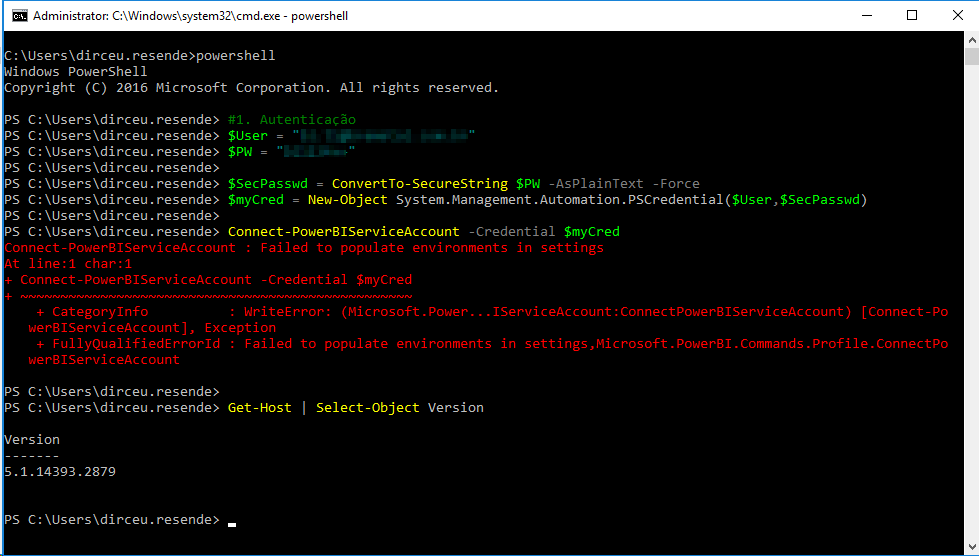
In this post, I would like to demonstrate to you the solution to a problem that happened to me a few days ago, when the automatic update routine for the Power BI dataset (How to use PowerShell and API with Agent or SSIS to automate updating a Power BI dataset) stopped updating, showing the error message below:
Connect-PowerBIServiceAccount : Failed to populate environments in settings
This feature is very interesting, as it allows you to use PowerShell Cmdlets to update Power BI datasets after running the data refresh in the data sources, avoiding the need to synchronize the data refresh in the source and dataset refresh in Power BI.
How to fix the problem
The solution to this problem ends up being very simple: Just update the Power BI Cmdlets on your server. To quickly find out if you are using the most current version, simply try installing the cmdlets again using the command below:
Install-Module MicrosoftPowerBIMgmtIf a message like the one below appears, your cmdlet version is out of date:

If this is your case, we will remove the current version and perform a new installation. To do this, navigate to the “C:\Program Files\WindowsPowerShell\Modules” directory and remove the directories highlighted below:

After removing these directories, try installing the cmdlets again:

Ready! Now your Powershell scripts for managing Power BI are up to date and working correctly:

If you want to know more about how to update your Power BI dataset using PowerShell cmdlets, be sure to read my article How to use PowerShell and API with Agent or SSIS to automate updating a Power BI dataset.
So that's it, folks!
I hope you liked this solution to a very simple problem to solve, but there isn't much documentation on the Internet.
A big hug and see you next time!

Comments (0)
Loading comments...