In this post I will show you how to quickly and simply solve a problem that, despite being simple and the message being very clear, I have seen many analysts not knowing how to solve.
Cannot resolve the collation conflict between “SQL_Latin1_General_CP1_CI_AI” and “SQL_Latin1_General_CP1_CS_AS” in the equal to operation.
What is a COLLATION?
What is a COLLATION?
Collation is nothing more than the way of encoding characters that a database uses to interpret them.
A Collation is a grouping of these characters in a certain order (each Collation has a different order), where “A” is a different character from “a”, if the collation is case-sensitive (case differentiation) and “a” is different from “á”, if the collation is Accent-Sensitive (accent differentiation).
COLLATION has three hierarchy levels:
– Server
– Database
- Column
If the database is created without specifying which collation will be used, it will be created with the server's collation (operating system language). When a table is created without specifying the collation of text columns (VARCHAR, NVARCHAR, CHAR, etc.), the database collation will be used as the collation of the tables.
In SQL Server, the Collation name follows the following naming pattern:
SQL_CollationDesignator_CaseSensitivity_AccentSensitivity_KanatypeSensitive_WidthSensitivity
Collation example:
SQL_Latin1_General_CP1_CS_TO THE
Where:
CollationDesignator: Specifies the basic grouping rules used by Windows grouping, where the sorting rules are based on alphabet or language.
CaseSensitivity: CI specifies case-insensitive, CS specifies case-sensitive.
AccentSensitivity: AI specifies that it is not accent-sensitive, AS specifies that it is accent-sensitive.
KanatypeSensitive: Omitted specifies that it is insensitive to kana characters, KS specifies that it is insensitive to kana characters.
WidthSensitivity: Omitted specifies that it is not width sensitive, WS specifies that it is width sensitive.
If a column is using a COLLATION case sensitive (CS), a query such as SELECT * FROM Table WHERE Column LIKE ‘%Oracle%’ will return the “Oracle” record, but will not return the “oracle” record.
The same thing happens with a column using a COLLATION accent sensitive (AS). A query like SELECT * FROM Table WHERE Column LIKE ‘%JOÃO%’ will return the record “João”, but will not return the record “Joao”.
To check the full list of Collations by region and language, access this link, remembering that the most used in Portuguese (Brazil) is SQL_Latin1_General_CP1_CI_AI (or SQL_Latin1_General_CP1_CS_AS).
An easy way to simulate this error is to create a table where two or more columns have different collations and try to make a WHERE comparison between these columns, a concatenation or create two tables with different collation columns and try to perform a join between the 2 columns.
It is worth remembering that this error only happens when comparing or manipulating two TEXT columns (VARCHAR, NVARCHAR, CHAR, etc.) from different collations.
IF (OBJECT_ID('tempdb..#Teste1') IS NOT NULL) DROP TABLE #Teste1
CREATE TABLE #Teste1 (
    Id INT IDENTITY(1,1),
    Nome1 VARCHAR(100),
    Nome2 VARCHAR(100) COLLATE SQL_Latin1_General_CP1_CS_AS
)

INSERT INTO #Teste1
SELECT 'SQL Server', 'Oracle'

SELECT A.Nome2 + ' é melhor que ' + A.Nome1
FROM #Teste1	A
SQL Server - Implicit conversion of varchar value to varchar cannot be performed because the collation of the value is unresolved due to a collation conflict between
Performing the query without changing structure
Performing the query without changing structure
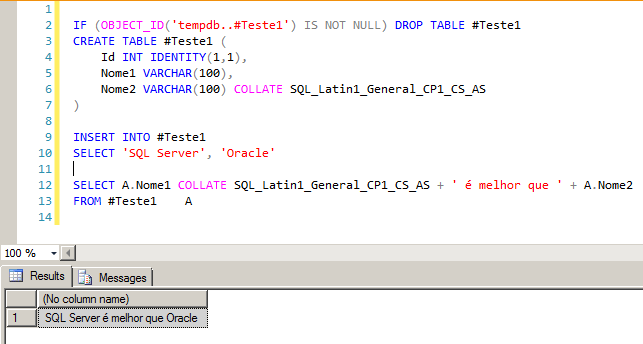
A simple, quick and practical way to get around this problem temporarily or when you do not have access to change the structure of the table/database, is to use the COLLATE operator in the select itself, which will convert all the data in the column to a specific collation and then you can compare and work with the data normally.
SELECT A.Nome1 COLLATE SQL_Latin1_General_CP1_CS_AS + ' é melhor que ' + A.Nome2
FROM #Teste1	A
SQL Server - Implicit conversion of varchar value to varchar cannot be performed because the collation of the value is unresolved due to a collation conflict between 2
You can still use the DATABASE_DEFAULT collation on the two columns involved, to guarantee compatibility between them, converting the two columns to the same database collation:
SELECT *
FROM #Teste1		A
LEFT JOIN #Teste1	B	ON	A.Nome1 COLLATE DATABASE_DEFAULT = B.Nome2 COLLATE DATABASE_DEFAULT
SQL Server - Collation conflict solving
This is a temporary and workaround solution, which should not be applied to large volumes of data, as performance is not ideal, as the entire column needs to be read and converted to then work with the data.
How to identify the database COLLATION
How to identify the database COLLATION
The first step when identifying a collation conflict problem between databases is to first identify the collation of the databases involved to try to understand if the problem is at this location. To identify the collation of a database, we can use the sp_helpdb command:
SQL Server - sp_helpdb
We can also use the sys.databases catalog view:
SELECT name, collation_name, compatibility_level
FROM sys.databases
WHERE name IN ('master', 'msdb', 'model', 'tempdb')
SQL Server - sys.databases collation compatibility level
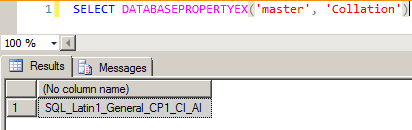
And also use the DATABASEPROPERTYEX function:
SELECT DATABASEPROPERTYEX('master', 'Collation')
SQL Server - DatabasepropertyEX Collation
How to identify the COLLATION of a column
How to identify the COLLATION of a column
After analyzing the collation of the databases involved and verifying that they are already using the same coding, let's now analyze the columns involved.
There are several ways to perform this check, such as sys.columns:
SELECT A.name, A.column_id, B.name, A.max_length, A.[precision], A.scale, A.collation_name
FROM msdb.sys.columns A
JOIN msdb.sys.types B ON A.user_type_id = B.user_type_id
WHERE [object_id] = OBJECT_ID('msdb.dbo.sysjobs')
SQL Server - sys.columns collation compatibility level
We can also obtain this information by analyzing the INFORMATION_SCHEMA database views:
SELECT COLUMN_NAME, ORDINAL_POSITION, DATA_TYPE, NUMERIC_PRECISION, NUMERIC_SCALE, COLLATION_NAME
FROM msdb.INFORMATION_SCHEMA.COLUMNS
WHERE TABLE_NAME = 'sysjobs'
SQL Server - Information_Schema Collation
How to change the COLLATION of the column
How to change the COLLATION of the column
A definitive solution to resolve the reported collation problem is to change the column that has a different character encoding than the rest, in order to standardize the table so that all columns use the same encoding.
To do this, simply use the command below:
ALTER TABLE #Teste1
ALTER COLUMN Nome2 VARCHAR(100) COLLATE DATABASE_DEFAULT
With this command, we are changing the Name2 column in our example to the same collation in the database. If you need to, you can change the collation to one of your choice, ignoring the database's default collation:
ALTER TABLE #Teste1
ALTER COLUMN Nome2 VARCHAR(100) COLLATE SQL_Latin1_General_CP1_CI_AI
How to change the Database COLLATION
How to change the Database COLLATION
Another definitive solution to this problem of conflict between collations is to change the database's default collation.
This is especially useful when the columns do not have a collation definition (using the database standard) and you are performing joins and/or manipulation with strings between columns from different databases, with different collations and are facing this problem.
Example command to change the database collation:
ALTER DATABASE MeuBanco COLLATE SQL_Latin1_General_CP1_CS_AS
And that's it, folks!
I hope you liked the post!
If you have any questions, just leave your comment
Hugs and see you next time!






Comments (0)
Loading comments...